
강의 https://www.boostcourse.org/ai100 를 수강하며 배운 내용을 정리한 글입니다.
어떻게 행렬과 매트릭스를 코드로 표현할 것인가?
방정식을 행렬형태로 표현
coefficient_matrix = [[2, 2, 1], [2, -1, 2], [1, -1, 2]]
constant_vector = [9, 6, 5]
선형대수에서 사용하는 수학 연산(dotp, norm) 등을 구현할 때에 리스트로 표현하기에는 구현이나 처리 속도의 문제가 있음
-> 패키지 활용, 고성능 과학 계산용 패키지 NumPy 넘파이 (Numerical Python)
Numpy의 특징
- 반복문 없이 데이터 배열에 대한 처리를 지원
activate ml
conda create -n upstage python=3.8

conda activate upstage
conda install nupmpy
conda install jupyter
코랩보다는 주피터 환경 선호
주피터 대신 코랩 사용 가능
코랩은 GPU 사용시 권장
ls
cd codes
cd numpy
jupyter notebook
ndarray
- 어레이라고 부름 nd 어레이
- numpy에서 배열 생성하는 방법
# numpy 호출 방법
import numpy as np # alias(별칭) np
test_array = np.array([1, 4, 5, 8], float)
print(test_array)
type(test_array[3])- numpy는 하나의 데이터 type(dtype)만 배열에 넣을 수 있음 -> dynamic typing not supported
- C의 Array를 사용해서 배열을 생성
- 메모리의 접근성이 좋음
- 메모리의 크기가 일정, 데이터 저장 공간 효율적
shape
shape: numpy array의 Dimension 구성을 리턴
dtype: numpy array의 데이터 type을 리턴
ndim: number of dimensions
size: data의 개수(element의 개수)
각 element가 차지하는 memory의 크기가 결정됨
array RANK
array의 RANK에 따라 불리는 이름
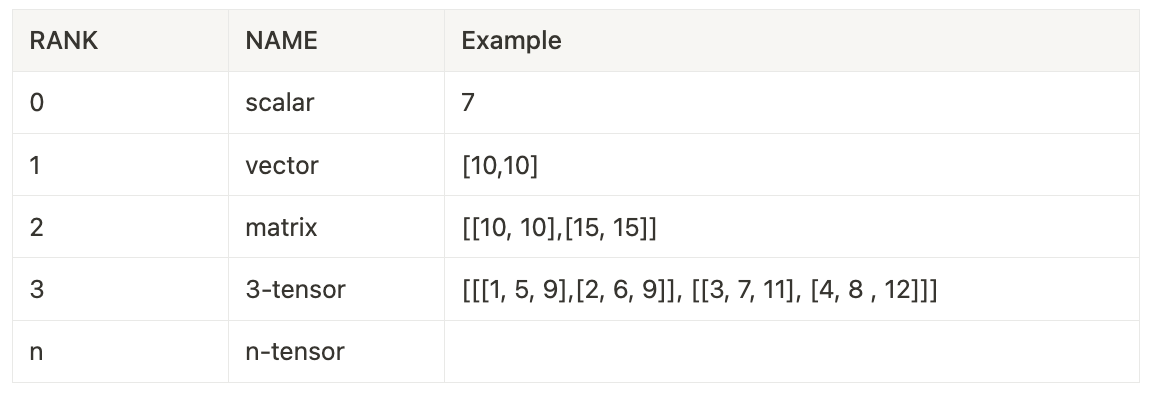
3-tensor 3 order tensor
# Data type을 integer로 선언
np.array([[1, 2, 3], [4.5, 5, 6]], dtype = int)

# Data type을 float로 선언
np.array([[1, 2, 3], [4.5, "5", "6"]], dtype = np.float32)
ndim
np.array(tensor, int).ndim
np.array(tensor, int).size
nbytes
# nbytes: ndarray object의 메모리 크기를 반환

# 32bits = 4bytes -> 6. * 4bytes
np.array([[1, 2, 3], [4.5, "5", "6"]], dtype=np.float32).nbytes

# 8bits = 1bytes -> 6. * 1bytes
np.array([[1, 2, 3], [4.5, "5", "6"]], dtype=np.int8).nbytes

# 64bits = 8bytes -> 6. * 48bytes
np.array([[1, 2, 3], [4.5, "5", "6"]], dtype=np.float64).nbytes'사이언스' 카테고리의 다른 글
| Pandas 두 날짜의 차이 계산 datetime.timedelta() (0) | 2024.11.23 |
|---|---|
| Pandas 이동평균 구하기 rolling().mean() (0) | 2024.11.23 |
| Pandas dt.to_period() 메서드 (0) | 2024.11.23 |
| 판다스 데이터 값 정렬 인덱스 초기화 sort_values().reset_index() (0) | 2024.11.13 |
| [TIL] 넘파이 numpy reshape, flatten (0) | 2024.11.11 |