
1. Mac OS에서 node.js 설치하기
맥북(Mac M2) Node.js 설치하기 homebrew
1. Homebrew 사용하기Homebrew가 설치되어있다면, 터미널 앱을 다음 코드를 실행해서 쉽게 설치 할 수 있다.brew updatebrew install node 설치가 완료되었다면 아래 코드를 입력해서 설치된 버전을 확인한다
ourjune.tistory.com
2. VS Code 설치하기
Visual Studio Code - Code Editing. Redefined
Visual Studio Code is a code editor redefined and optimized for building and debugging modern web and cloud applications. Visual Studio Code is free and available on your favorite platform - Linux, macOS, and Windows.
code.visualstudio.com
3. VS Code에서 파일-> 폴더열기로 작업 디렉토리 생성

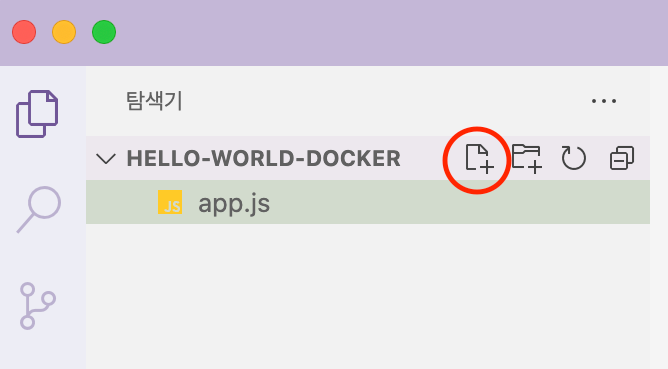
4. 탐색기에서 파일 추가 버튼을 눌러 app.js 파일 만들기
5. node.js 실행해보기
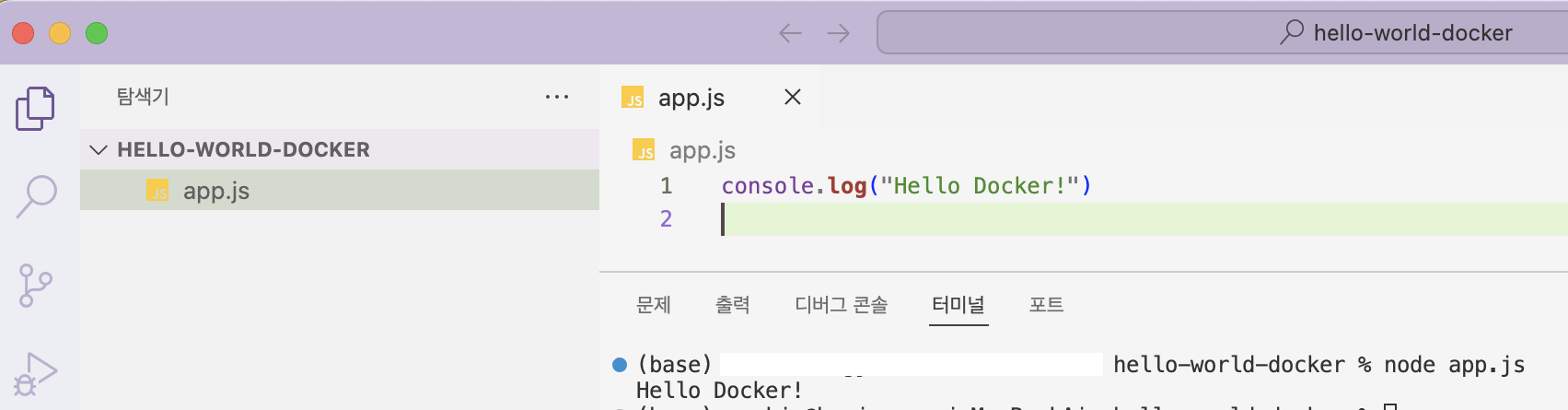
app.js에 console.log 함수를 이용해 "Hello Docker!" 출력해보기
console.log("Hello Docker!")
node app.js 명령어를 터미널에 입력하여 출력을 확인한다
6. node.js용 패키지 관리자 npm을 init 한다
npm init 명령어는 node.js를 실행하기 위한 initial 과정으로 VS Code 터미널에서 명령어 입력시 package name, description 등 질문에 응답하면 package.json이 만들어진다. 모든 정보를 입력할 필요는 없고 사전에 등록할 정보가 없다면 Enter키를 통해 넘어갈 수 있다.
% npm init

This utility will walk you through creating a package.json file.
It only covers the most common items, and tries to guess sensible defaults.

See `npm help init` for definitive documentation on these fields
and exactly what they do.

Use `npm install <pkg>` afterwards to install a package and
save it as a dependency in the package.json file.

Press ^C at any time to quit.
package name: (hello-world-docker)
version: (1.0.0)
description: nodejs test
entry point: (app.js)
test command:
git repository: https://github.com/jueundev/nodeproject.git
keywords: node.js
author: ourjune
license: (ISC)
About to write to /Users/~/airflow/ourjune/hello-world-docker/package.json:

{
  "name": "hello-world-docker",
  "version": "1.0.0",
  "description": "nodejs test",
  "main": "app.js",
  "scripts": {
    "test": "echo \"Error: no test specified\" && exit 1"
  },
  "repository": {
    "type": "git",
    "url": "git+https://github.com/jueundev/nodeproject.git"
  },
  "keywords": [
    "node.js"
  ],
  "author": "ourjune",
  "license": "ISC",
  "bugs": {
    "url": "https://github.com/jueundev/nodeproject/issues"
  },
  "homepage": "https://github.com/jueundev/nodeproject#readme"
}


Is this OK? (yes) yes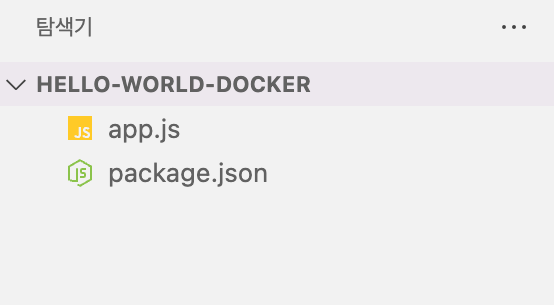
package.json 파일은 npm을 통해 생성되는 node 관련 component들의 dependency를 관리하기 위한 모듈이다.
'데브코스 데이터엔지니어링' 카테고리의 다른 글
| Git, Github 기본 용어 정리 (0) | 2024.11.18 |
|---|---|
| CI/CD 자동화 소프트웨어 빌드 devops (0) | 2024.11.18 |
| 맥북(Mac M2) Node.js 설치하기 homebrew (1) | 2024.11.18 |
| 프로그래머스 문자 반복 출력하기 (1) | 2024.11.14 |
| 파이썬 Python 문자열 join 함수 (1) | 2024.11.14 |